
My Car - Car Management
KineApps LtdAuto & Vehicles
4.4101.00 Reviews
- Version
- 5.1.311
- Installs
- 500.00K
- Age Rating
- Everyone
Screenshots
Our Review of My Car - Car Management
 Analysis by Appyee
My first useful test of a car-management app is whether it helps me turn a vague worry—“When did I last deal with that?”—into a clear next step. My Car - Car Management is built around that everyday problem: keeping fuel, spending, maintenance and vehicle details together instead of scattered across receipts, calendar notes and the glovebox. It’s a free Auto & Vehicles app from KineApps Ltd, rated 4.3 on average by around 5,300 users, and it has passed 500,000 installs. That gives it a sizeable audience, but the real question is whether its routine suits the way you actually look after a car.
Start with the information you already have
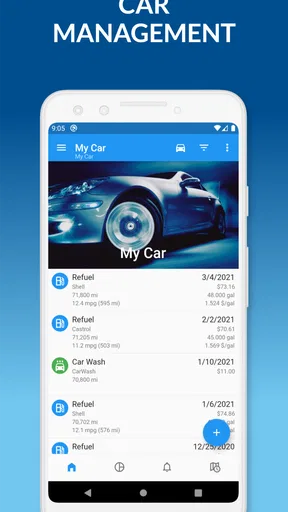
Downloading My Car - Car Management was a cinch. Available on both Android and iOS, it took me just a few taps to get it running. Right off the bat, the app greets you with a clean and user-friendly interface. No clutter, no unnecessary distractions—just pure functionality. You start by entering your car's basic information, and let me tell you, I was surprised by how intuitive it all was. From the make and model to the license plate number, the app guides you through every step like a trusty co-pilot.
The most useful way to begin is to treat setup as a small paperwork session, not a task to rush through while standing beside the car. Gather the details you tend to look up later, then add the vehicle and make sure its identifying information is right. A typo in a plate number or a forgotten service detail can make a tidy record less useful when you need it, so I’d rather spend a few calm minutes checking than have to untangle the history later.
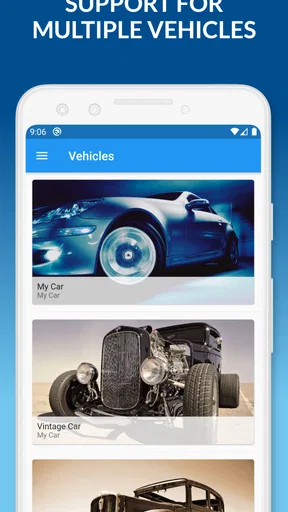
If you manage more than one vehicle, the value is less about having an impressive dashboard and more about keeping each car’s history distinct. A household car, a work vehicle and a second car can have different service rhythms and costs; records are easier to interpret when you consistently log them against the right vehicle. I’d start with the car you use most, build the habit there, and add another only when you know what information you want to keep for it.
Turn maintenance into a usable timeline
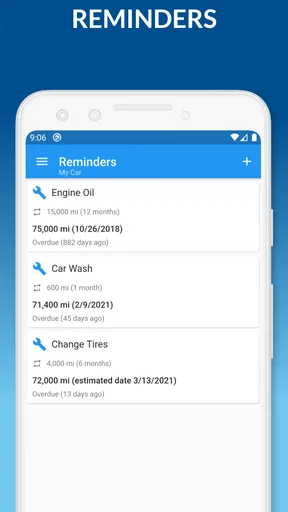
Once you've got your car set up, it's time to dive into the features. And there are plenty! First up is the maintenance logs. Forget the days of scribbling down notes in your glovebox; now, every oil change, tire rotation, and service appointment is neatly logged in one place. The app even sends you reminders, so you never miss an important date again. It's like having your own personal assistant dedicated to your vehicle.
In practice, reminders help most when the underlying record is dependable. After a service, I’d enter the work while the invoice is still in front of me, rather than relying on memory a week later. That small habit gives future reminders more meaning: you can tell whether a task is genuinely coming up or whether you simply forgot to record that it was done. It also makes the app more useful when you speak with a mechanic, because you can check your own history before agreeing to repeat work.
A less obvious use is to record repairs and ordinary upkeep separately in your own mind, even if both belong in the maintenance history. When a warning light appears or a new noise develops, an accurate sequence of past work can help you explain what changed and when. The app is a record-keeping aid, not a diagnosis tool, so I wouldn’t use a reminder or an old entry as a reason to ignore a new symptom. For anything safety-related, a qualified mechanic is the better next step.
Make fuel and spending records tell a story
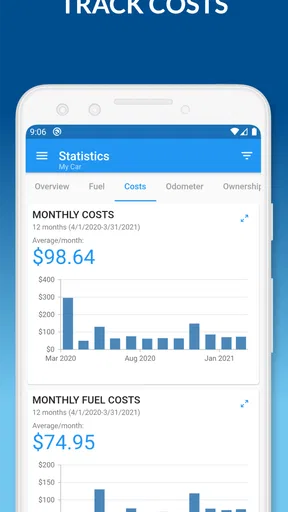
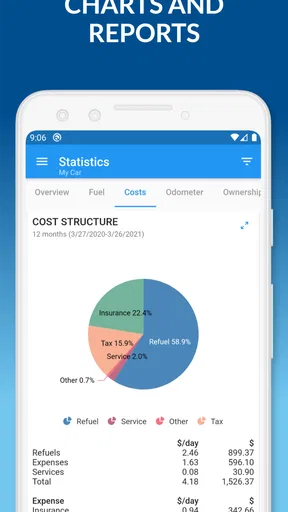
Next, we have expense tracking. This feature is a godsend for anyone who wants to know where their money is going. Fuel costs, repairs, insurance—you name it, the app tracks it. And the best part? It provides you with detailed reports, so you can see exactly how much you're spending on your ride each month. I found it eye-opening, to say the least.
For the numbers to be worth comparing, consistency matters more than perfect bookkeeping. If you log fuel sometimes but skip it whenever you’re busy, the resulting picture can be misleading. I’d choose a simple routine—add the purchase after filling up, and record other costs when they happen—rather than trying to reconstruct a whole month from bank statements. That makes the reports a practical prompt for questions such as whether repair costs are becoming a regular pattern, not a substitute for formal budgeting.
A realistic example is a driver who fills up on the way home, then later wonders why the monthly car budget feels tighter. Recording the fuel purchase at the time and adding a repair or insurance cost when it arrives puts those expenses in one place. After a while, the useful outcome may not be a dramatic saving; it may simply be seeing which costs are routine and which were unusual. That distinction can make planning the next month less of a guess.
Use fuel records carefully, not as a driving score
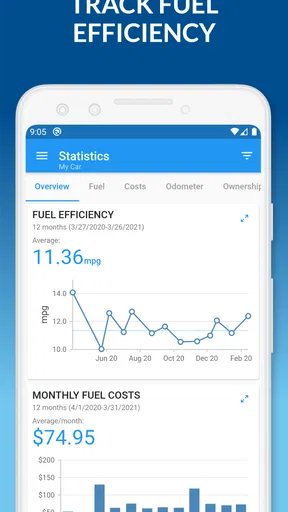
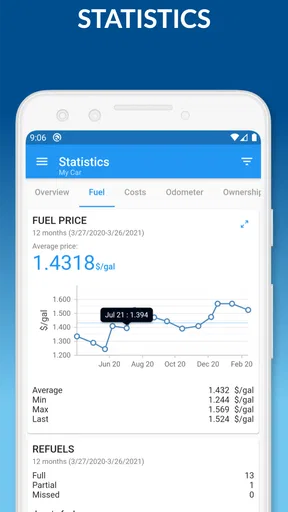
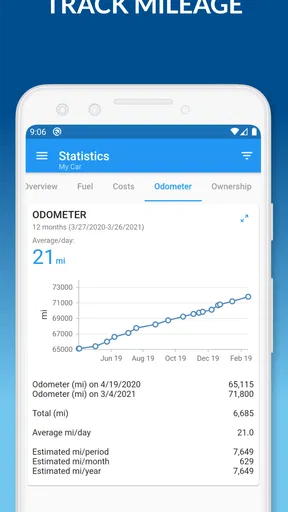
For those of us obsessed with fuel efficiency, this app is a goldmine. You can log every fill-up and monitor your vehicle’s mileage. Over time, it builds a picture of your car's fuel efficiency, helping you make informed decisions about your driving habits. I discovered that being a bit lighter on the gas pedal could actually save me a few bucks!
The fairest comparisons come from entries made in a repeatable way. If you want to see whether consumption has changed, record mileage and fill-ups consistently rather than comparing one partial tank with a different kind of trip. A long motorway drive, cold weather and stop-start traffic can all make two stretches of driving feel unlike each other. I’d look for a trend across several entries, not treat one result as proof that a particular route or driving change caused it.
This is also where patience pays off. Fuel tracking needs repeated input before it becomes a useful personal history; it cannot make a meaningful comparison from details you never enter. If you dislike logging purchases or rarely drive the same vehicle, this part may feel like a chore rather than a benefit. If you are already curious about running costs, though, a modest routine can help turn that curiosity into a record you can actually use.
Keep documents close, with sensible boundaries
But wait, there's more. My Car - Car Management also includes a nifty feature that allows you to store important documents. From your insurance policy to your vehicle registration, everything is securely saved in the app. No more rummaging through drawers when you need that information in a pinch.
Having a document available on your phone can be handy when you need to check a detail away from home, but I’d still keep the original paperwork where it belongs and avoid treating a saved copy as a replacement for an official document. A practical workflow is to add the items you are likely to consult, give yourself enough time to check that they are legible, and know where the paper versions are kept. That way, the app serves as a convenient reference instead of becoming the only place you can find something important.
There is a privacy trade-off whenever personal vehicle documents are stored digitally. I’d be selective about what I put in any app and use ordinary phone security, such as a passcode, rather than assuming a digital copy is automatically risk-free. For someone who often needs to check registration or insurance details while away from home, convenience may outweigh that extra consideration. If you prefer not to keep sensitive paperwork on a phone, the document feature is easy to leave out of your routine while still using the tracking tools.
From a quick entry to a useful result
I find the most useful way to judge a car log is to follow one piece of information from the moment it happens to the moment it helps me make a decision. With My Car, that might mean turning a service invoice into a record I can check before the next garage visit, rather than letting the details fade. The payoff depends on a small, repeatable habit: enter the useful facts while they’re still in front of you, then return to them when planning upkeep or reviewing costs.
Where the app fits in a driver's routine
The app runs like a dream. I didn't encounter any lags or crashes, which is a massive plus in my book. It's clear that the developers have put a lot of thought into creating a seamless user experience. The navigation is straightforward, and everything is exactly where you expect it to be.
Moreover, the app's design is sleek and modern. It's easy on the eyes, with a pleasant color scheme that makes using it a joy rather than a chore. I found myself actually looking forward to logging my car details, which is no small feat!
That ease of navigation matters in a very ordinary handoff: the service is finished, the mechanic gives you an invoice, and you want to preserve what was done before you forget. I’d enter the maintenance while the details are fresh, then use the record later when planning the next visit. If another person in the household handles the car, a shared habit of recording costs and work can also make conversations about upkeep more concrete—though the app is still only as complete as the entries people make.
Compared with a paper folder, this approach makes records easier to scan and gives fuel and spending entries a place alongside maintenance. Compared with a general notes app or calendar, it is more focused on vehicle ownership, so relevant information is less likely to get buried among unrelated reminders. On the other hand, a spreadsheet may suit a driver who wants custom calculations, and a basic calendar may be enough for someone who only needs a single annual reminder. The right choice depends on whether you want an ongoing car history or just an occasional nudge.
The app is a strong fit for drivers who want one place to remember service work, watch expenses and build a fuel record without turning car care into a project. It is also useful for someone who has recently bought a vehicle and wants to start a history from the beginning. I would skip it if you don’t want to enter information regularly, prefer to keep all records on paper, or need a highly customised fleet-management system rather than personal vehicle tracking.
My Car - Car Management is free to download and is rated for Everyone. The current version is 5.0.300, and it requires Android 7.0 or later; in-app purchases range from $0.99 to $109.99 per item. That free starting point makes it reasonable to try the basic routine before deciding whether any paid option is relevant to you. I’d check the purchase details in the app before committing, and I wouldn’t assume a paid item is necessary just to benefit from keeping more organised records.
When the tidy workflow breaks down
The main friction is the same thing that makes the records valuable: you have to keep them current. Miss several fuel entries and efficiency comparisons lose their usefulness; forget to log a service and a later reminder may not reflect what actually happened. For a driver who enjoys keeping records, that is a manageable trade-off. For someone who wants every detail captured automatically with no effort, a manual tracking routine is likely to disappoint.
It is also worth separating reminders from professional advice. A reminder can help you remember an interval you have entered, but it cannot judge the condition of a tyre, assess a strange sound or decide whether a repair is urgent. I would use the app to remember and review, then rely on the vehicle handbook and a mechanic for decisions that affect safety. That boundary keeps an organised log from creating false confidence.
Finally, the app is most useful when you have a clear reason to keep records. If you only want to store one document or remember one service date, a paper note or ordinary calendar entry may be simpler. If you want to see where ownership costs go, preserve maintenance history and make fuel entries part of a regular routine, this focused tool has a more convincing purpose. The best test is whether you will actually add information after each fill-up or service, not how many features you might use someday.
Wrapping Up: Is It Worth It?
In a word: absolutely. My Car - Car Management is a must-have for anyone looking to take control of their vehicle upkeep without breaking a sweat. It's packed with features that are genuinely useful, not just flashy add-ons. Plus, the reminder system ensures that you stay on top of every detail, from maintenance to expenses.
If you're juggling multiple vehicles or just want a reliable way to manage your car, this app is definitely worth checking out. It's like having a personal assistant for your car, minus the hefty salary. So, go on, give it a whirl. Your car—and your wallet—will thank you!
Verdict
Strengths of My Car - Car Management
- User-friendly interface for easy navigation.
- Comprehensive vehicle maintenance tracker.
- Customizable reminders for service schedules.
- Fuel efficiency monitoring with detailed reports.
- Supports multiple vehicles for family use.
Limitations of My Car - Car Management
- Limited integration with smart devices.
- No real-time traffic updates available.
- Ads can be intrusive without premium.
- Limited data export options.
- Initial setup can be time-consuming.
Similar Picks in This Category
View All
Android Auto
Google LLC4.1

maxim — order a taxi & food
PT. SITO4.7

Штрафы ГИБДД: проверка с фото
Pays LLC – Штрафы ГИБДД4.7

Номерограм – проверка авто
Авто Ассист4.8

Дром Авто
Дром4.9

Frequently Asked Questions
What features does My Car - Car Management offer?
My Car - Car Management provides a comprehensive suite of features to help you keep track of your vehicle’s maintenance schedule, fuel expenses, and trip logs. It includes reminders for service appointments, a fuel efficiency tracker, and the ability to document repairs. Additionally, the app allows for multiple vehicle management, making it ideal for families or car enthusiasts.
Is My Car - Car Management available for both Android and iOS?
Yes, My Car - Car Management is available for download on both Android and iOS platforms. You can find it on the Google Play Store for Android devices and the App Store for iOS devices. Ensure your device meets the app's system requirements for optimal performance.
Does My Car - Car Management require a subscription?
My Car - Car Management offers both free and premium versions. The free version includes basic features like maintenance reminders and fuel tracking. For more advanced features, such as detailed analytics and cloud backup, you can opt for a subscription plan. Pricing varies, and there are often promotions available.
How secure is my data in My Car - Car Management?
Data security is a priority for My Car - Car Management. The app uses encryption to protect your information and offers cloud backup options for premium users. It’s important to regularly update the app to the latest version to benefit from the newest security enhancements and features.
Can My Car - Car Management handle multiple vehicles?
Yes, My Car - Car Management is designed to handle multiple vehicles. You can easily switch between different car profiles within the app, making it simple to track maintenance schedules, fuel consumption, and expenses for each vehicle separately. This feature is particularly useful for families or individuals managing several cars.
